
Can Teams Translate Chinese to English? Captions and Voice

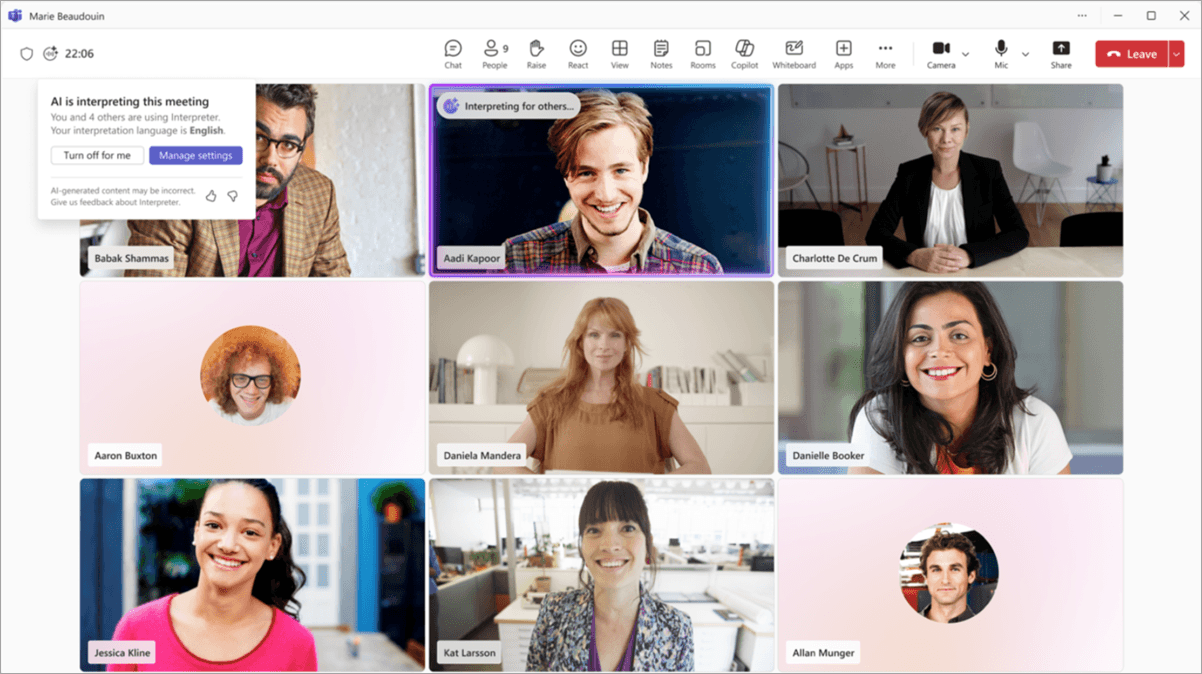
Can Teams translate Chinese to English? Yes—Teams offers translated captions, while Teams Interpreter supports spoken interpretation between Mandarin Chinese and English. These are separate features with different licensing and account requirements: reading English captions does not automatically make your supplier hear your reply in Chinese. (support.microsoft.com)
Can Teams translate Chinese to English as captions or audio?
For a weekly production meeting, separate three tasks:
- Incoming captions: You hear the supplier speaking Chinese and read English text.
- Incoming interpreted audio: You listen to an English interpretation of Chinese speech.
- Outgoing Chinese speech: You speak English and want the supplier to hear Chinese.
Ordinary live captions transcribe speech. Translated captions change the text language; they do not supply a spoken reply. (support.microsoft.com)
Official documentation checked November 16, 2026. Choose based on whether you need translated text, interpreted audio, or outgoing Chinese speech—and whether you control the meeting.
Option | Spoken input | Translated text output | Translated audio output | License holder | Who enables it? | External-meeting considerations |
|---|---|---|---|---|---|---|
Teams live captions | Supported Chinese recognition setting | None; transcription only | No | No translation add-on needed for ordinary captions | Participant, subject to admin policy | Captions can be disabled by policy |
Teams translated captions | Supported Chinese recognition setting | English, Japanese, and other supported destinations | No | Organizer or individual attendee with Teams Premium or Microsoft Copilot | Participant selects translation language | Organizer entitlement is not the only documented route |
Teams Interpreter | Mandarin Chinese, English, and other supported languages | Multilingual speech recognition also turns on | Yes, in the user's selected listening language | Eligible Microsoft 365 and Teams licenses plus Microsoft Copilot for individual user access | Participant turns it on personally; admin policy applies | Verified, licensed external accounts can use it; guest and anonymous participants cannot |
Zoom translated captions | Configured Chinese input language | English and other enabled destinations | No, not through this caption feature | Host with a qualifying plan or assigned add-on | Host/admin enables; participant chooses output | Your caption choice depends on the host's entitlement and available pairs |
Deeptrue | Chinese or English | Live translated subtitle overlay | Outgoing AI-generated Chinese speech through Interpreter Mode | Person running Deeptrue | That person runs the app and selects the microphone for voice output | Other participants need no Deeptrue account or installation; company software policies still apply |
The platform distinctions above follow Microsoft's caption help, Interpreter requirements, Interpreter user guidance, and Zoom's translated-caption requirements. (support.microsoft.com)
How do you set Teams captions for Chinese-to-English translation?
Start by checking the spoken language, not just the language you want to read. Microsoft's recognition-language list includes these labels:
- Chinese (Simplified, China)
- Chinese (Traditional, Hong Kong SAR)
- Chinese (Traditional, Taiwan)
Translation destinations include Chinese Simplified, Chinese Traditional, Japanese, and English. A Traditional Chinese caption label is not, by itself, proof of support for a particular spoken dialect. These labels come from Microsoft's live-caption documentation. (support.microsoft.com)
What is the short setup sequence?
- In the Teams meeting, select More actions > Captions.
- In the captions pane, select Open caption settings.
- Check the spoken-language setting against the Chinese being spoken.
- Select English as the translation language. For a Chinese-to-Japanese meeting, select Japanese instead.
Microsoft documents this settings path in its multilingual speech recognition guidance. For the broader interface walkthrough, see our Teams live translation guide; use the dated licensing notes here when evaluating eligibility. (support.microsoft.com)
Does the supplier need Teams Premium?
Not necessarily. Microsoft's user help describes two routes:
- An organizer with Teams Premium or Microsoft Copilot enables translated captions and transcription for all participants.
- An attendee with Teams Premium or Microsoft Copilot can access translation for themselves without relying on the organizer's entitlement. (support.microsoft.com)
Documentation disagreement: The administrator article still describes an organizer-Premium requirement, whereas the user help explicitly includes Copilot and individually licensed attendees. These descriptions are not fully aligned as of November 16, 2026. Confirm the entitlement assigned to the account you will actually use, rather than assuming the supplier must purchase Premium. (learn.microsoft.com)
What if the controls are missing?
- No caption controls: Ask your administrator whether live captions are disabled by the per-user meeting policy.
- Captions work, but translation is missing: Check the organizer's entitlement or your individual entitlement, and verify that you joined with the account carrying that license.
Treat these as different problems: a policy can block captions, while translation has additional entitlement requirements. (learn.microsoft.com)
What happens when participants switch between Chinese and English?
There are three distinct situations. They should not be treated as the same language-detection problem.
Meeting pattern | What to check |
|---|---|
Each participant consistently speaks one language | Use individual spoken-language selections with Teams multilingual speech recognition |
One participant switches languages between turns | Check the spoken-language setting; Interpreter separately provides automatic spoken-language detection when enabled |
A speaker mixes Chinese and English within one sentence | Do not assume automatic detection guarantees correct handling; separate critical details into clear turns |
These distinctions reflect Microsoft's separate guidance for multilingual recognition and Interpreter. (support.microsoft.com)
How is multilingual speech recognition different from Interpreter?
Teams multilingual speech recognition supports Chinese, Japanese, and English. Available with Teams Premium or Microsoft Copilot, it supports individual spoken-language selections and translated captions/transcripts without requiring Interpreter. (support.microsoft.com)
In the meeting event, open Options > Recording and transcription to enable multilingual speech recognition. Participants then check their spoken and translation languages in caption settings. See Microsoft's multilingual recognition instructions. (support.microsoft.com)
This is useful when the factory representative speaks Chinese and your project manager speaks English. Individual input settings are different from a promise that any speaker can switch languages freely inside every sentence.
How do you turn on interpreted audio?
Teams Interpreter supports Mandarin Chinese and English as speaking and listening languages; Japanese is also supported. (learn.microsoft.com)
- Select More actions > Language and speech > Interpreter.
- Choose Turn on for me.
- Select English under Listen to meeting in.
- Select Turn on. (support.microsoft.com)
Enabling Interpreter also turns on multilingual speech recognition. Microsoft warns that rapid exchanges, interruptions, overlapping dialogue, and technical terms can cause problems; do not assume mixed-language sentences or part numbers will be handled correctly. See the Interpreter user guide. (support.microsoft.com)
For individual user access, Microsoft Learn lists eligible Microsoft 365 and Teams licenses plus Microsoft Copilot. Copilot includes 20 interpretation hours per user per month; additional access is subject to available capacity, rather than a stated absolute cutoff. The organization's AIInterpreter policy controls access and is enabled by default. (learn.microsoft.com)
There is another wording caveat: the same administrator page separately says a Microsoft 365 license is required to listen. That does not establish a universal entitlement for unlicensed listeners or guests. Turning Interpreter on for yourself should not be treated as enabling Chinese audio for everyone else. For more on personal use in external meetings, see Teams live translation just for you. (learn.microsoft.com)
What can you control when the Chinese-speaking team hosts?
Use these three questions before accepting the meeting setup.
1. Who scheduled the meeting?
- Teams: Check the organizer's translation entitlement or your own individual entitlement.
- Zoom: Confirm the host's qualifying plan or Translated Captions add-on; your output-language choice does not replace that requirement. (support.microsoft.com)
2. Which account will you use?
For Teams Interpreter, use a verified Microsoft 365 account with a valid Microsoft Copilot license when joining another organization's meeting. Guest and anonymous participants cannot use it, according to Microsoft's Interpreter FAQ. (support.microsoft.com)
Being outside the supplier's organization is therefore not the same as joining as a guest or anonymously. Verify the intended account before the meeting.
3. Do you need readable captions or audible translation?
If captions are sufficient, test that route first. If you need to hear English or deliver a Chinese spoken reply, test the audio workflow separately—including who needs to enable it and which microphone will be used.
You can send this message to the organizer:
Before our production meeting, could you confirm whether we will use Teams or Zoom, whether translated captions are enabled, and whether Chinese-to-English and English-to-Chinese are available? Please also confirm which account I should use to join. I need to read the Chinese updates in English and confirm quantities and shipment dates. Could we schedule a short caption and audio check beforehand?
Regional availability check: Do not treat Chinese-language support as confirmation that the feature will work on your mainland-China network or in your Microsoft cloud environment. Test the actual meeting environment before relying on it.
How do you translate Chinese captions in Zoom?
As of November 16, 2026, Zoom's participant help lists these host entitlements:
- Zoom Workplace Business Plus
- Zoom Workplace Enterprise Essentials
- Zoom Workplace Enterprise Plus
- Zoom Workplace Enterprise Premier
- An assigned Zoom Translated Captions add-on
Do not assume any paid Zoom account includes translated captions. (support.zoom.com)
Zoom lists Chinese (Simplified), Chinese (Traditional), Cantonese, Japanese, and English among its translated-caption languages. Its configuration distinguishes speaking input from translated-caption output. (support.zoom.com)
For a Chinese–English production meeting:
- Ask the host to confirm automated captions are enabled first.
- Confirm translated captions are also enabled.
- Check that Chinese-to-English is available, plus English-to-Chinese if the other side needs to read your replies. Supported pairs are enabled by default but can be restricted; administrators can lock settings.
- Check the speaker's caption input language.
- As a reader, select the arrow beside Show Captions, then enable Translation under Captions and translation. Choose English and select Save. (support.zoom.com)
Within the host's enabled language pairs, participants can choose their own translated-caption language. Changing the input language alone does not translate captions. When a speaker changes languages, follow the documented input-language workflow rather than assuming their current setting will handle the change. (support.zoom.com)
These steps follow Zoom's configuration guide and viewing instructions. For broader account setup, see our Zoom real-time translation guide.
This section concerns translated captions, not every Zoom interpretation product. A current add-on price was not verified: Zoom's setup page directs customers to Sales. (support.zoom.com)
How can you read Chinese captions and send a Chinese spoken reply with Deeptrue?
Deeptrue is a desktop app that works alongside Teams, Zoom, and other desktop meeting apps. It separates understanding the supplier from delivering your reply, without requiring the supplier to install Deeptrue or create an account.
For a Chinese-to-English meeting, use this workflow:
- Run Deeptrue alongside the Teams or Zoom desktop app. It requires macOS 13+ or Windows 10+.
- Use Live Translated Caption for Chinese-to-English subtitles. You see the spoken sentence and its translation in a semi-transparent overlay on top of the meeting screen.
- Use Interpreter Mode for your reply. Speak English and use Chinese as the translated output language.
- Select Deeptrue Microphone in the meeting app. Deeptrue delivers the translated Chinese speech in a natural AI-generated voice through this virtual microphone.
Only the person wanting translation runs Deeptrue, and no meeting bot needs to be invited. Follow your employer's software-approval policies before installing or using it.
Smart Suggestion (Assistant Mode) is different: It displays target-language sentences for you to read aloud in your own voice. Interpreter Mode supplies AI-generated translated speech. See Interpreter Mode for the outgoing-voice workflow.
You can use Custom Instructions / Add Context to upload meeting files or notes so suggestions are more accurate. This is not a guarantee that captions or voice output will recognize every part number correctly. After a meeting, Deeptrue saves original and translated transcripts with speaker labels for review; critical quantities and commitments still need confirmation.
How should you confirm quantities and shipment dates?
Illustrative script, not a product test, customer case study, or captured translation output.
Imagine the supplier gives this weekly production update:
A-317这批共1,200件,其中24件需要返工,预计2026年11月20日出货。
English meaning:
This batch of A-317 contains 1,200 units; 24 need rework. Shipment is planned for November 20, 2026.
Your reply:
To confirm, November 20, 2026 is the planned shipment date, not the arrival date?
Suggested Chinese wording:
请确认,2026年11月20日是预计出货日期,不是到货日期,对吗?
Reading the update in English solves the understanding task. Delivering the question in Chinese is a separate reply task. Test both directions rather than assuming one person's caption settings cover everyone.
Keep a shared confirmation table. This is a recommended meeting practice, not a feature claim about any product.
Field | Illustrative entry | Confirmation needed |
|---|---|---|
Part number | A-317 | Confirm letters, digits, and hyphen |
Total quantity | 1,200 | Confirm whether this includes the rework units |
Rework quantity | 24 | Confirm completion timing |
Unit | Units | Confirm these are individual items, not cartons |
Shipment date | November 20, 2026, planned | Confirm dispatch, not arrival |
Arrival date | Not stated | Request separately |
Responsible person | Not stated | Assign an owner for follow-up |
Spell out identifiers, separate quantities from percentages, and speak one turn at a time. Confirm commercial commitments in writing rather than treating translated captions or transcripts as approval. For broader pair-specific preparation, see Chinese–English meeting translation.
What will it cost, and what should you check before the meeting?
The following pricing and entitlement information is dated November 16, 2026. Check the full licensing requirements before purchasing; an add-on price is not necessarily the total setup cost.
Option | Verified cost or entitlement | Important condition |
|---|---|---|
Teams Premium, US | $10/user/month equivalent, paid yearly | Auto-renewing annual add-on; not the total eligible Microsoft setup cost |
Teams Premium, Japan | ¥1,499/user/month equivalent, paid annually | Excludes consumption tax; auto-renewing add-on, not the full setup cost |
Teams Interpreter | Eligible Microsoft 365 and Teams licenses plus Microsoft Copilot for individual access | 20 hours/user/month included; additional access subject to capacity |
Zoom translated captions | Qualifying host plan or assigned add-on | Current add-on quote not verified; contact Sales |
Deeptrue Free | $0; 60 minutes | Up to 30 minutes per session |
Deeptrue Pro | $29/member/month; 300 minutes | Up to 100 minutes per session |
Deeptrue Business | $49/member/month; 800 minutes | No per-session limit; total usage is not unlimited |
Microsoft prices come from its US business pricing page and Japan business pricing page. Interpreter entitlement and included hours follow Microsoft Learn; Zoom's setup page directs add-on inquiries to Sales. Deeptrue Pro and Business prices are USD with monthly billing; see plan details. (microsoft.com)
Before the production call, confirm:
If you need English captions plus an outgoing Chinese voice workflow, download Deeptrue to rehearse on an approved desktop. The Free plan includes 60 minutes, with up to 30 minutes per session.
FAQ
Can Teams translate Chinese to English in real time?
Yes. Use translated captions for English text or Interpreter for Mandarin-to-English audio, subject to the relevant licensing and account requirements. (support.microsoft.com)
Can an external guest use Teams Interpreter?
No. Microsoft excludes guest and anonymous participation; external users need verified Microsoft 365 accounts with valid Microsoft Copilot licenses. (support.microsoft.com)
Why is the translation option missing in Teams?
Check your licensed account and organizer entitlement. If captions themselves are missing, ask about the live-caption policy. Have your administrator verify your setup, given the differing licensing descriptions. (support.microsoft.com)
Can Zoom participants choose their own translated-caption language?
Yes, within the host's enabled language pairs. The host needs a qualifying plan or assigned add-on, with the required caption settings enabled. (support.zoom.com)
How can I speak English and have the supplier hear Chinese?
With Deeptrue Interpreter Mode, you speak English and select Deeptrue Microphone in Teams or Zoom to deliver AI-generated Chinese speech. If you plan to use Teams Interpreter instead, verify the supplier's access and listening setup separately. (support.microsoft.com)
Related posts
Teams Interpreter Agent License: Copilot and Guest Rules
Check Teams Interpreter agent license requirements, guest restrictions, translated caption access, and costs before buying Premium or Copilot.

Best Real Time Chinese Translator for Supplier Calls
Compare phone apps, meeting captions, AI voice translation and human interpreters for Chinese supplier calls, including setup, records and costs.
2026 Guide: Microsoft Teams Live Translation & AI Voice Interpretation
Explore real-time translation and AI voice interpreting in Microsoft Teams. Compare Deeptrue, available on Zoom, Teams, Meet, and Webex.
Stay in the loop
Get the latest Deeptrue updates and industry insights delivered to your inbox.