
Log in

Zoom Interpretation

Real-time interpretation that speaks for you in Zoom meetings.
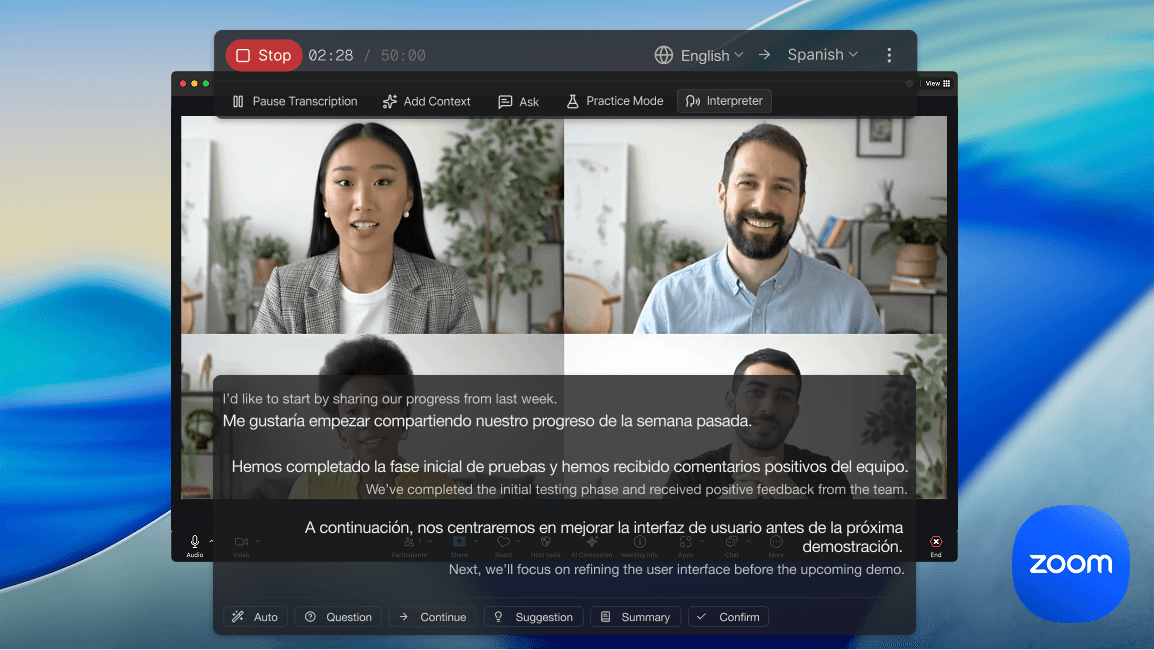
Zoom Interpretation

Live Interpretation for Zoom with AI

When you speak in your language, Deeptrue instantly translates and speaks for you in the other person’s language.
interpreter feature
How it works interpreter feature

One-click setup for instant interpretation

Select Deeptrue Microphone as your input, and it automatically listens, translates, and speaks for you in real time. No bots or plugins, simply enable the mic and start speaking naturally.

Use anywhere, on any platform

With the Deeptrue desktop app, you can use it on any meeting platform. Just set up the Deeptrue Microphone once, and it works seamlessly across Zoom, Google Meet, Teams, Webex, and more with no extra setup needed.

google-meet
teams
zoom
whatsapp
discord
webex
slack
youtube
hopin
livestorm
google-meet
teams
zoom
whatsapp
discord
webex
slack
youtube
hopin
livestorm
google-meet
teams
zoom
whatsapp
discord
webex
slack
youtube
hopin
livestorm
google-meet
teams
zoom
whatsapp
discord
webex
slack
youtube
hopin
livestorm
google-meet
teams
zoom
whatsapp
discord
webex
slack
youtube
hopin
livestorm
google-meet
teams
zoom
whatsapp
discord
webex
slack
youtube
hopin
livestorm
Deeptrue

Your real-time voice-to-voice translator
for any platform

Speak freely in any language

Communicate naturally, even in languages you don’t know. Deeptrue instantly translates your voice in real time so you can connect smoothly in any global meeting or daily call.

Real-time interpretation at lower cost

Get faster, more affordable translation than human interpreters. The AI voice-to-voice translator delivers instant, natural speech and captions for effortless multilingual meetings.

No bots or plugins

Use Deeptrue anywhere like Zoom, Google Meet, Teams, and more. Select Deeptrue Microphone, start speaking, and enjoy real-time voice translation without bots or plugins.

FAQ

Have you any questions?

Find answers about Zoom Interpretation.

Deeptrue’s Interpreter Mode is an AI speech translator that listens, translates, and speaks for you in real time. It works as a meeting translator on any platform like Zoom, Google Meet, or Teams, helping you communicate confidently in any language.
Deeptrue uses AI-powered speech recognition and real-time translation to convert your voice into another language instantly. Once you select Deeptrue Microphone as your input, the system processes your speech locally, translates it in real time, and outputs a natural AI voice in your partner’s language with no bots or plugins required.
Deeptrue creates a virtual microphone driver on your computer that sends your translated AI voice directly to your meeting app. This allows Deeptrue to act as a real-time interpreter on platforms like Zoom or Google Meet without needing to invite a bot. The setup is quick and works seamlessly across any platform.
Yes. Deeptrue works seamlessly on all major meeting platforms including Zoom, Google Meet, Microsoft Teams, Webex, and more. Just set up the Deeptrue Microphone once, and you can use real-time meeting translation anywhere.
Deeptrue currently supports a wide range of languages for real-time translation and interpretation, including English, German, Dutch, Swedish, Danish, Norwegian, French, Italian, Spanish, Portuguese, Romanian, Japanese, Chinese, Korean, Russian, Ukrainian, Bulgarian, Polish, Slovak, Latvian, Lithuanian, Hindi, Indonesian, Malay, Turkish, Greek, Hungarian, Finnish, Estonian, Vietnamese, and Thai.
Most translation tools only show translated text captions or work inside a single platform like Zoom, Teams, Webex, or Google Meet. Deeptrue goes further, it’s a real-time voice-to-voice translator that speaks for you on any meeting app without bots or plugins. It combines instant speech translation, natural AI voices, and cross-platform support, giving you true real-time interpretation for global meetings.
Yes. Deeptrue provides voice-to-voice translation and translated captions in real time. You can listen to the AI’s voice output or read the translated text, perfect for accessibility and meeting notes.
No. Deeptrue requires no external bot or plugin. Once you install the desktop app and select Deeptrue Microphone, you can start real-time AI translation instantly on any meeting platform.
No. All audio is processed in real time and deleted immediately after translation. Deeptrue never stores or shares your voice data, and all transmissions are encrypted. Your meeting content always remains private and secure.
Deeptrue offers flexible pricing based on usage and subscription plans. You can start with a free trial that includes real-time voice translation and upgrade to Pro or Business plans for longer meetings and enterprise features.
Next steps

Ready to join?

Let's get you started.

No credit card required.