
Google Meet Notetaker
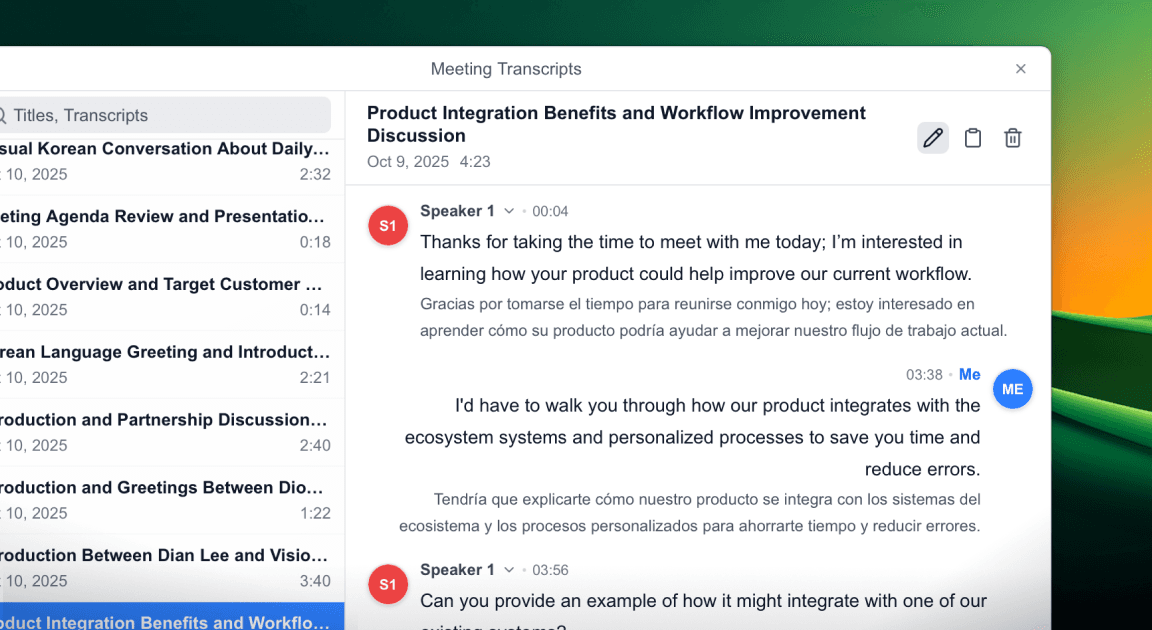
Deeptrue saves both the original and translated transcripts after your meeting.
Review every part of the conversation anytime.

Automatic transcript with translations
Each translated transcript is saved automatically as a meeting note. After your call, you can review the full conversation and translated text anytime.

Live translated captions during Google Meet meetings
Follow every conversation easily in multilingual meetings with real-time translated captions. Deeptrue shows live translated captions as participants speak, helping you stay focused on the discussion without switching apps. After the meeting, all captions are saved automatically as a translated transcript, so you can review everything later.
Review and organize your meetings
Deeptrue creates a full transcript with speaker labels after every meeting. Review what each person said and organize key points or follow-ups easily.

Never miss a word
in global meetings
Real-time, sentence-by-sentence translation
Deeptrue automatically detects when a sentence ends and delivers instant translation without delay. Even while you’re speaking continuously, captions update in real time so you can follow every moment naturally.
Save time and cost without human interpreters
Skip the hassle of scheduling or paying for interpreters. Deeptrue provides instant voice-to-voice and caption translation across any meeting platform, helping you communicate globally with zero setup time.
Secure and private by design
All conversations are encrypted and automatically deleted when you remove meeting records. Once you delete your session, no data or transcripts remain in the cloud.
Explore Related Features
Discover other powerful features to enhance your experience

Have you any questions?
Find answers about Google Meet Notetaker.